

The sixth BluMach alpha, 0.1.0-alpha.6, is out. This time there’s only one new machine, but it’s different from all the previous ones: the Olivetti M10, an 8-bit portable from 1983. It isn’t a PC and it doesn’t run on the emulator inherited from 86Box, but on CoreMach, the engine I split off from BluMach.
Like the previous ones, it’s experimental; in this case, a proof of concept for bringing in architectures other than x86.
Before you download: BluMach does not include ROMs, BIOS files or operating systems. You’ll have to obtain them yourself; they are not distributed with the program.
The Olivetti M10
Olivetti introduced the M10 in 1983 as a computer that fitted in a briefcase. It ran on four AA batteries, kept programs and text in 8 to 32 KB of battery-backed RAM and had a ROM menu with an address book, a text editor, communications and Microsoft BASIC. The display is a tilting 240 × 64 dot LCD, and external storage was cassette.
Olivetti didn’t design it from scratch, and it isn’t a copy of the TRS-80 Model 100 either. They were built by Kyocera, which also made Tandy’s Model 100 and a version for NEC. They share an origin, a processor (an OKI 80C85) and much of the design, but the case, board, keyboard, character set and ROM are different. The exterior design is credited to Perry A. King and Antonio Macchi Cassia.
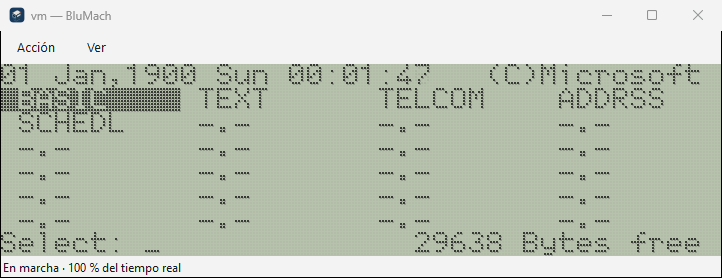
The screenshot shows the menu after a cold boot with 32 KB. The 1900 date isn’t an emulation bug: on a cold boot the ROM resets the clock to zero, and you have to set it from BASIC with DATE$ and TIME$.
Why the M10
For the first CoreMach machine inside BluMach I wanted something that didn’t look like a PC. The M10 has a different CPU (an 8085 instead of an x86), a different clock, an LCD with its own controllers and a keyboard read directly by the board. If CoreMach could run it without touching the core inherited from 86Box, the split between engine and interface worked. M10 machines never go through that core: they open in their own window.
The board is written from Olivetti’s service manual, Kyocera’s schematic and the datasheets for each chip. I consulted MAME only as a secondary source, for the order of the LCD controllers, the serial port bits and one printer pin, without using its code. How that documentation became code, and what is exact and what is approximate, is in the engineering note.
What you can do with it in BluMach
- Create it from the catalogue, choosing the RAM (8, 16, 24 or 32 KB), the keyboard language, which on the real machine was set with jumpers (Italian, French, German or British), and the clock: the host computer’s time or a fixed start for repeatable tests. The RAM and the clock are saved in the machine’s folder, so your programs are still there when you open it again.
- Use BASIC and the ROM applications in their own window, with integer scaling and, if you like, an imitation of the LCD’s look.
- Sound from BEEP and SOUND.
- Serial port: sends a text file at the programmed speed and saves what it receives.
- Cassette: CSAVE and CLOAD with WAV tapes.
- Printer: LPRINT and LLIST save each printout as a text file.
What it doesn’t have: the barcode reader, the US version’s modem and the low battery warning. The Settings window doesn’t work for the M10 either; to change the RAM or the keyboard you have to create another machine.
What has been checked and what hasn’t
“Checked” means I’ve seen it work myself with the original ROM, not that the emulation is exact.
| Part | Checked | Pending |
|---|---|---|
| Menu and BASIC | They start with the free bytes the manual gives for 8, 16, 24 and 32 KB | More software from the period |
| RAM and clock | Kept between sessions; automatic power-off after ten minutes of inactivity | — |
| Sound | BEEP and SOUND | Comparing the tone with a real machine |
| Serial port | SAVE and LOAD through COM: at 9600 bit/s | BREAK and the RTS, DTR and CTS lines |
| Cassette | CSAVE and CLOAD, also with a WAV file sampled at 11,025 Hz | A tape recorded on a real M10 |
| Printer | LPRINT and LLIST | — |
Timing is calculated per instruction, not per bus cycle. That’s enough for what the M10 does, but it isn’t exact.
Known issues
- The clock on first boot. Even if you choose “Host time” when creating the machine, the first boot shows 1 January 1900, because the ROM resets the clock to zero on a cold boot. Just set it once with
DATE$andTIME$; from then on it’s kept. - A warning on cold boot. For a moment the status bar shows “unsupported operation (io_read 82h…)”. The ROM reads a port the emulation doesn’t model; it doesn’t affect how the machine works.
Photos on the machine pages
The pages for the M10, M15, M28, Prodest PC 1 and PC 1 HD, Amstrad PC1512 and Toshiba T3200 now show a freely licensed photo, with its author and licence. Clicking the image opens the page I took it from.
Packages built on GitHub
Until now I built each release on my own computer. From this one on, GitHub builds the package from the release tag. Each ZIP comes with its SHA-256 and a manifest with the BluMach and CoreMach commits it was built from.
Download
The release is on the alpha.6 page on GitHub. For now there’s only a 64-bit Windows version :-( I hope that changes soon. Unzip it into a new folder and open BluMach.exe. The release guide explains where the M10 ROM goes, with its SHA-256, and the known limitations.
If something fails, open an issue on GitHub with the version, the machine, the configuration and the steps to reproduce it.